Nubank agentic payments

Nubank connects with your agent for agentic payments

Agentic payments for Pix and Virtual Cards. Let your agent checkout with Pix and Virtual Cards through your account, while you choose approval every time or delegated limits up to BRL 1,000.

Open

Built on the Model Context Protocol. Works with any agent that speaks MCP — Claude, your assistant, your own.

Trusted

The agent dashboard in the Nu app manages connections and payment limits, so you can review, adjust, or revoke access anytime.

Capable

Amount available for purchase is the only account value your agent can check. It can prepare Pix and Virtual Card checkout requests without receiving credentials.

Connect your agent

Add Nubank to your agent in one step

Open your AI agent, point it at Nubank MCP, and approve the connection. No SDK, no API keys to copy.

Use ChatGPT App
Or copy this prompt
As my AI agent, connect to my Nubank account. Read https://new-mcp-demo.marciovm.com/skill.md, and use the MCP server at https://new-mcp-demo.marciovm.com/mcp.

Paste this into Claude Code, Cursor, Windsurf, Codex, or any AI agent.

Works with every agent
ClaudeCursorChatGPTGeminiCodexWindsurfClineVS CodeOpenClaw
1

Add Nubank

Tap a button above or paste the prompt. Your agent reads skill.md and adds the Nu MCP server.

2

Approve once

Nu shows its own approval screen. Pick what the agent can do and tap Approve — your password never leaves Nu.

3

Set payment scope

Choose Always require approval or Delegated authority, then adjust limits from the Nu app dashboard anytime.

Payment limits. Choose Always require approval, or give Delegated authority with per-transaction and daily limits up to BRL 1,000.

Pix and Virtual Cards checkout

Let it checkout. You set the payment scope.

When your agent needs to checkout from a merchant, Nubank prepares a Pix or Virtual Card checkout approval. You can require app confirmation every time or let the agent pay within saved payment limits.

  • Always require approval. The agent never moves money on its own. It prepares the checkout and waits for your in-app decision.
  • Delegated authority. Let an agent spend inside your transaction and daily limits, never above BRL 1,000.
  • Funding stays yours. When approval is required, choose Account balance or Pix Financing before confirming.
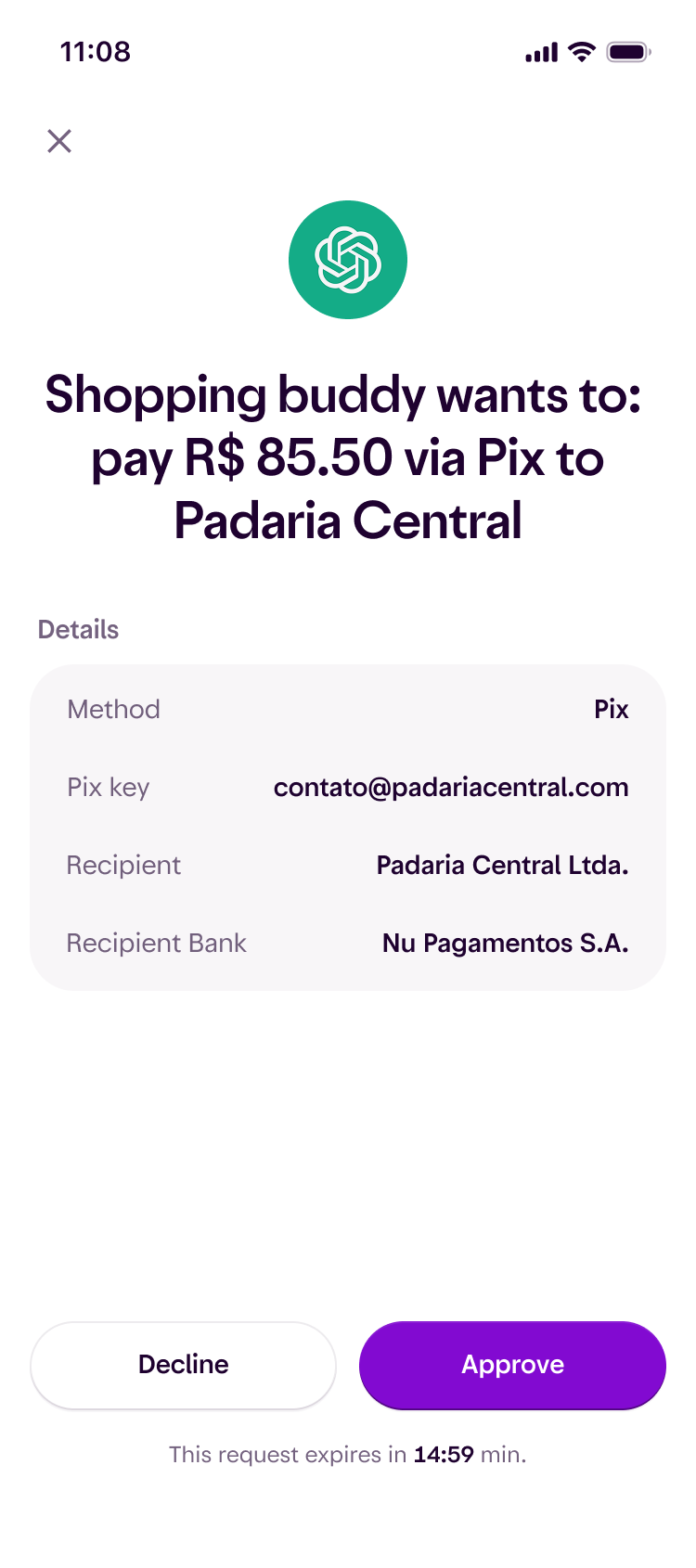
Nubank app action authorization screen for a Pix payment

Built on trust

Your money stays yours

Payment scope is explicit

Use approval every time or delegated authority with limits you can change.

Credentials never exposed

Your agent never receives credentials or account activity. It can only check amount available for purchase and prepare checkout requests.

Pix and Virtual Cards checkout

Every checkout shows merchant, amount, rail, funding source, and approval status.

Revoke access anytime

Cut an agent off in one tap from the Nu app. Instantly.

Nubank agentic payments are coming to Brazil.
Give your agent a Nu wallet.

Be among the first to connect your AI agent to a bank account built for the Agentic Web.

Brazil · English. By joining you agree to hear from Nu about early access.